
Understanding the Differences and Applications of Standard DP, Mini DP, and USB-C Alt Mode: A Complete Analysis of High-Definition Audio/Video Transmission Interfaces
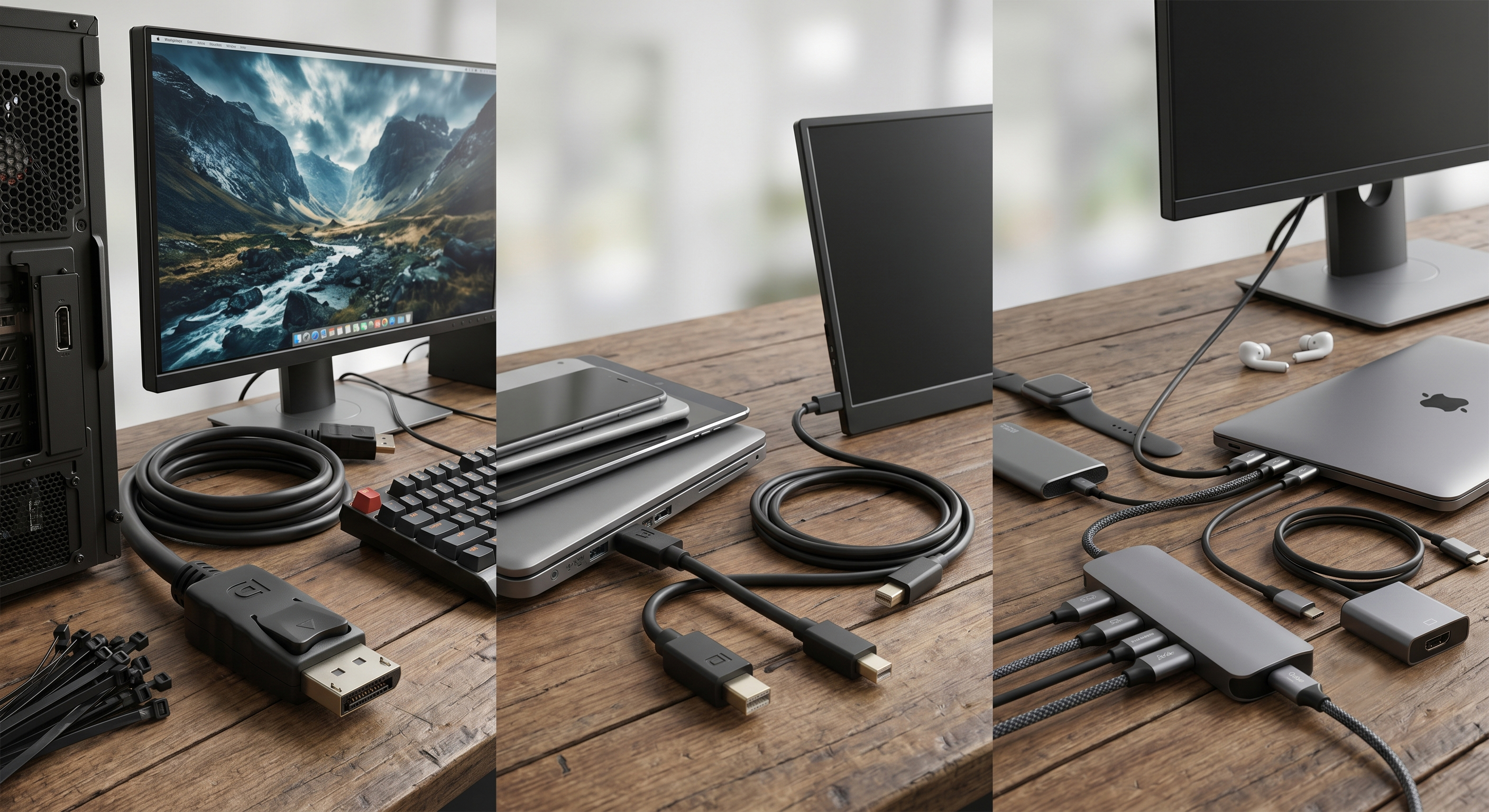
In the evolutionary history of DisplayPort (DP), the connector has adapted across three primary physical forms to accommodate the spatial constraints of desktop PCs, laptops, and mobile devices, while continuously pushing for higher bandwidth and multi-functionality. With the widespread adoption of 8K resolution, high-refresh-rate gaming monitors, and ultra-thin laptops, selecting the right DP interface is critical to ensuring an optimal visual experience.
The following section provides a technical classification and application analysis of DisplayPort connectors:
1. Standard DisplayPort (Standard DP): The Solid Foundation for Desktop PCs and Gaming Monitors
This is the most prevalent specification in high-end display sectors, commonly found on desktop graphics processing units (GPUs) and premium monitors. When you require stable DisplayPort 2.1 or 1.4 signal transmission, Standard DP is typically the optimal choice.
-
Physical Characteristics & Latching Mechanism: It features a rectangular shape with one chamfered corner for orientation safety (fool-proofing design) and contains 20 pins. Its critical feature is the mechanical latching mechanism. Standard DP connectors are usually equipped with two small metal hooks that lock upon insertion. The user must press the button on the connector housing to release it. This effectively prevents signal interruption caused by vibration or accidental pulling, which is particularly vital in industrial environments or engineering-grade installations.
-
Application Scenarios & Long-Tail Keywords: PC hosts, gaming monitors, and professional graphics workstations. When configuring multi-monitor daisy-chain systems or gaming setups requiring high refresh rates of 144Hz and above, the Standard DP interface delivers the most reliable physical connection and bandwidth assurance.
2. Mini DisplayPort (mDP): The Mobile Transition and Flexible Choice for Professional GPUs
Developed by Apple and subsequently adopted into the VESA standard, Mini DP was designed primarily to address the spatial limitations of early laptops—a product born from the pursuit of device thinning.
-
Physical Characteristics & Capabilities: It occupies approximately one-quarter of the volume of a Standard DP connector. It also features 20 pins but in a much tighter arrangement.
-
Key Functionality: Despite its reduced form factor, its electrical performance is completely identical to Standard DP, supporting the same bandwidth and resolutions. This means that using a Mini DP to Standard DP adapter cable will not result in any loss of image quality or refresh rate.
-
Application Scenarios & Market Status: Early MacBook series, Microsoft Surface laptops, and certain professional graphics cards with multi-output configurations (e.g., a single GPU providing 6 mDP outputs for video wall installations). Note: Due to the ubiquity of USB-C, newer products rarely feature mDP, as it has been progressively phased out and replaced by USB-C Alt Mode.
3. USB Type-C (DP Alt Mode): The Modern Industrial Benchmark for Single-Cable Connectivity
While not a traditional DP interface by design, this is currently the most significant form of DP transmission. Via the DisplayPort Alternate Mode (Alt Mode) protocol, DP video signals can be routed directly through a standard USB-C connector. This is currently the most widely discussed technology in the laptop-to-monitor connectivity market.
1.Physical Characteristics & Integration Advantages: Utilizes the standard 24-pin USB-C connector.
2.Key Functionality:
(1)Single-Cable Solution: Simultaneously transmits up to 8K video, USB data, and power delivery (PD fast charging). This contributes significantly to desktop clutter reduction in workspaces.
(2)High Integration: Enables laptops, tablets, and even smartphones to eliminate dedicated video ports, maximizing internal PCB space and driving the development of ultra-thin laptops.
3.Application Scenarios & Long-Tail Keywords: Modern ultra-thin laptops (MacBook, Dell XPS), high-end smartphones, and monitors that support direct USB-C connectivity. When purchasing Thunderbolt 4 or USB4 devices, the underlying architecture natively includes support for DP Alt Mode.
Quick Reference Table: DP Connector Specifications
|
Type |
Pin Count |
Latching Mechanism |
Core Advantage |
Current Market Status |
Long-Tail Keywords |
|---|---|---|---|---|---|
|
Standard DP |
20 Pin |
Yes (Button Latch) |
Most stable physical connection, highly durable |
Mainstream (Desktop) |
Gaming monitor DP cable |
|
Mini DP |
20 Pin |
None |
Space-saving, zero performance loss |
Declining |
Mini DP adapter |
|
USB-C (DP) |
24 Pin |
None |
Integrates power charging, data, and video |
Mainstream (Mobile/Laptop) |
USB-C monitor output |
4. Internal Interface: eDP (Embedded DisplayPort)
This category of connector is generally invisible to end consumers as it resides entirely inside electronic devices.
-
Functionality & Technical Details: Used to connect the motherboard of a laptop or tablet to its internal LCD/OLED panel.
-
Characteristics: These are typically ultra-fine pitch wire-to-board connectors. Featuring low power consumption and robust electromagnetic interference (EMI) resistance, eDP is the foundational internal technology that enables modern laptop screens to achieve ultra-high refresh rates like 240Hz or 360Hz.
Selection Guide: How to Choose the Right Interface?
When conducting hardware selection for your product architecture:
-
If your application demands physical stability and vibration resistance (such as industrial computers or gaming desktops), Standard DP is the premier choice.
-
If your design prioritizes extreme thinness and multi-functional convergence, USB-C (DP Alt Mode) stands as the current industrial benchmark.
Technical Q&A: Troubleshooting DisplayPort Pain Points
Q1: Do all USB-C interfaces support DisplayPort monitor output?
A: No, not all USB-C ports support this feature. You must verify that the USB-C port is labeled with the DisplayPort Alt Mode logo (typically an icon resembling a "DP" stylized letter) or explicitly supports Thunderbolt 3/4 or USB4. Please consult your equipment's technical manual before purchasing.
Q2: How do I determine whether I need a DP 1.4 or a DP 2.1 cable?
A: This depends entirely on the resolution and refresh rate requirements of your display and graphics card. DP 1.4 supports up to 8K @30Hz or 4K @144Hz. If you are targeting 8K @60Hz (with Display Stream Compression / DSC) or higher configurations like 4K @240Hz, you will require a DP 2.1 cable capable of supporting higher bandwidth classes (UHBR10/13.5/20).
Q3: Will adapting Mini DP to Standard DP degrade the signal quality?
A: If you use a high-quality passive adapter cable, there is generally no signal degradation. This is because Mini DP and Standard DP share identical underlying electrical protocols. However, if you need to run exceptionally long cable spans or connect multiple displays, an active adapter may be required to maintain adequate signal integrity.
Q4: Can I connect two DP monitors simultaneously using a single USB-C port?
A: Yes, provided that your host device supports Multi-Stream Transport (MST) technology, and your USB-C port (or Thunderbolt docking station) delivers sufficient bandwidth. Note that certain devices (such as older or base-model Apple Silicon Macs) may impose single-external-display limitations when using USB-C hubs under certain modes.