
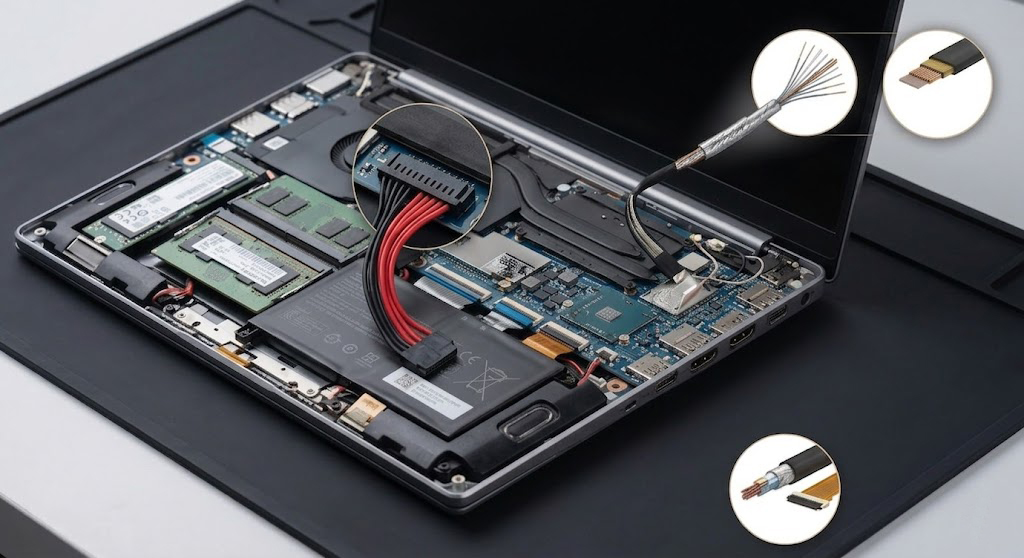
 Laptops: Common Types of Connectors and Cables
To achieve high integration within limited space, laptops utilize a variety of precision connectors and cables. These components are responsible not only for power delivery but also for handling high-speed signals to ensure stable operation.
Below is a classification of common internal and external connectors and cables found in laptops:
1. Internal Board-to-Board and Module Connectors
These connectors primarily handle communication between the mainboard and various sub-boards or modules:
-
FPC/FFC Connectors (Flexible Printed Circuit / Flexible Flat Cable): The most common internal connection method used for touchpads, keyboards, fingerprint modules, or sub-boards. They feature a low-profile design with pitches typically ranging from 0.3mm to 0.5mm.
-
M.2 Slots: Used for installing SSDs and Wi-Fi/Bluetooth wireless cards. They support PCIe or SATA signals depending on the key type (e.g., M-Key, E-Key).
-
DDR SO-DIMM Slots: Memory slots. Laptops typically use the shorter SO-DIMM version.
-
Micro-Coaxial Connectors (I-PEX / Micro-Coaxial): Primarily used for display panel signal transmission (eDP interface) and wireless card antennas. They effectively suppress electromagnetic interference (EMI).
2. External Interfaces and I/O Connectors
Responsible for connecting external devices, these interfaces are currently trending toward standardization and higher specifications:
-
USB Type-C (USB-C): The core of modern laptops, supporting Power Delivery (PD) charging, data transfer (USB 3.2/4), and video output (DisplayPort Alt Mode).
-
HDMI / DisplayPort: Standard video output interfaces used for connecting external monitors or projectors.
-
RJ45 Network Port: Gradually disappearing from ultra-thin laptops but still common in gaming or business models, sometimes using a drop-jaw (folding) design to save space.
-
3.5mm Audio Jack: A combo jack for headphones and microphones.
3. Internal Wire Harness Assemblies
Cables act as bridges for electrical current and signals inside the laptop:
-
Display Cables (LVDS/eDP Cable): Connect the mainboard to the display panel. They usually consist of a bundle of micro-coaxial wires wrapped in braided mesh or aluminum foil to withstand the durability demands of frequent hinge opening and closing.
-
Battery Cables: Connection wires between the battery pack and the mainboard. They must carry high currents and typically consist of multiple thick-gauge wires paired with specific flame-retardant connectors.
-
Fan Cables: Typically 3-pin or 4-pin miniature connectors responsible for power supply and PWM speed control signals.
-
Speaker Wires: Connect the mainboard to the speaker modules, usually consisting of simple two-core twisted pair wires.
4. Technological Trends
-
High-Frequency & High-Speed: With the adoption of USB4 and PCIe Gen5, connectors have extremely strict requirements for impedance matching to minimize signal reflection.
-
Miniaturization & Low Profile: To achieve thinner chassis designs, the mated height of connectors is continuously being reduced.
-
Reliability Testing: Cables passing through the hinge must undergo tens of thousands of bending tests to ensure long-term durability.